

Suggestions
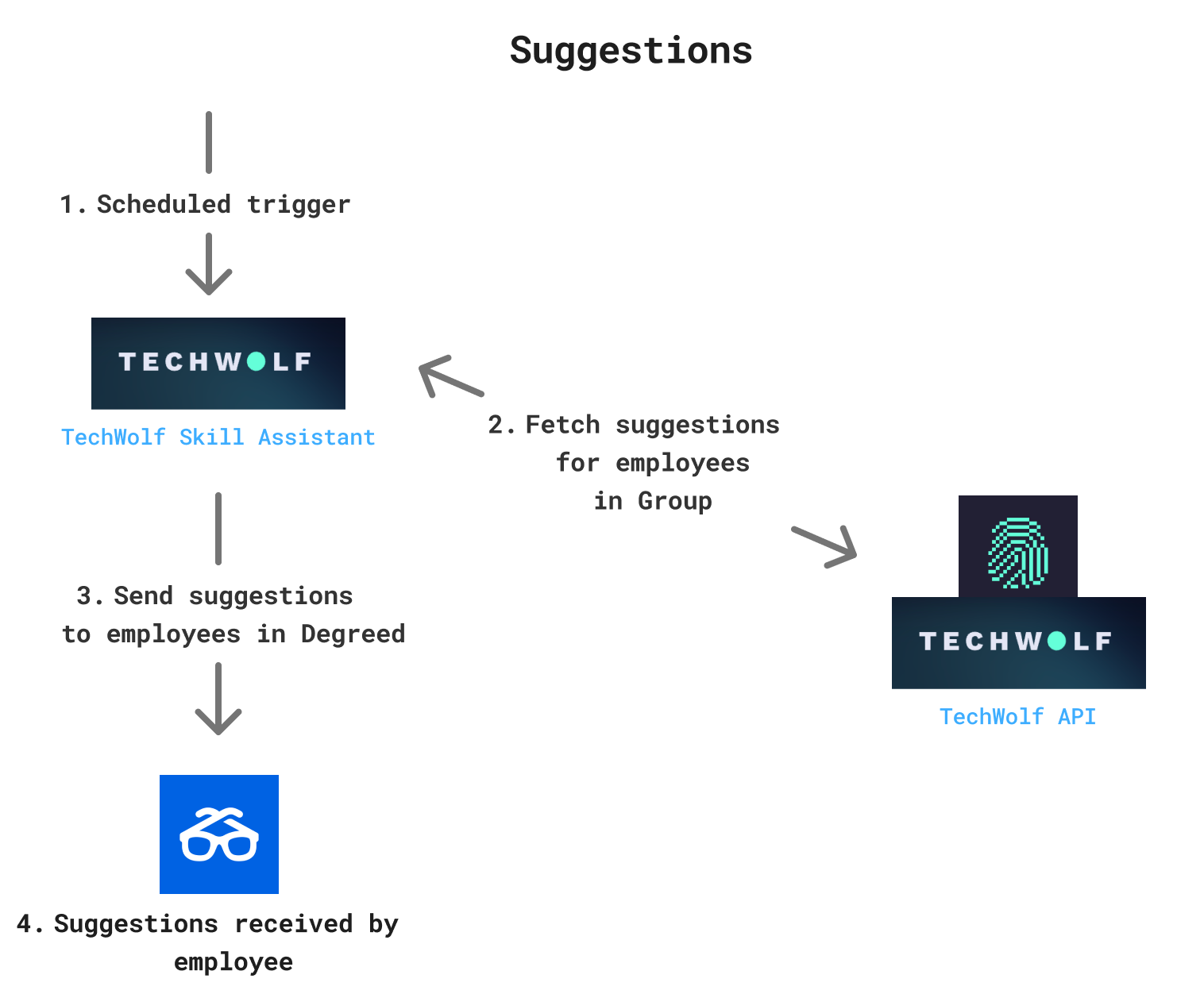
- Scheduled trigger: We send out suggestions at specific time intervals. On such an interval cycle, we trigger the TechWolf Skill Assistant. The interval can be changed depending on your needs.
- Fetch suggestions: To get those suggestions, we fetch them from our own API. More specifically, from the Suggestions Skill Profile endpoint, for all employees that are part of the TechWolf Skill Assistant group.
- Send suggestions: We send out the suggestions to the Degreed platform.
- Users receive the Skill Suggestions and Notifications: The Degreed platform delivers the Skill Suggestions to the correct user.
How the Skill Engine API max skills setting affects suggestions
The Skill Engine API uses themax_skills setting to return the top ranked
Skills for an Employee based on their data. This setting does not directly mean
that an Employee will only ever see that number of suggestions over time.
The ranking is based on the Employee Skill Profile and includes Skills that were
already accepted or rejected. The Skill Engine API then filters out already
validated Skills before suggestions are shown in the Skill Assistant.
What happens near the limit
Rejected Skills can still influence the topmax_skills ranking through an
indirect effect. A rejection acts as feedback for the recommendation model and
can change the confidence scores of related Skills. When an Employee is close to
the limit, this recalculation can reorder the Employee Skill Profile and cause a
different Skill to enter the top max_skills.
- The Skill Engine API returns the top
max_skillsSkills from the Employee Skill Profile. - The Employee validates suggestions (for example, accepts 6 and rejects 4).
- The recommendation scores are recalculated based on the new feedback, including the rejection signal, which can change nearby Skill rankings.
- If this recalculation pulls another Skill into the top
max_skills, that Skill can appear as a new suggestion.
What happens when data changes
When new Skill Events are added, probabilities can change and different Skills can enter the topmax_skills ranking. This can create new suggestions for the
Employee.
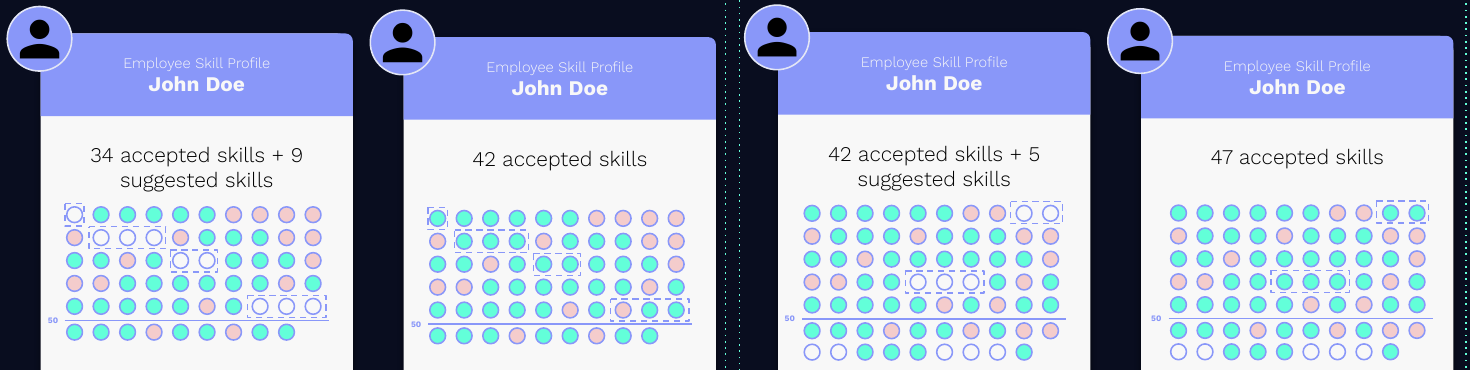
- New Skill Events are added for the Employee.
- New inferred Skills are scored and compared against the current top
max_skillsranking. - Only the new Skills that enter the top
max_skillsbecome visible suggestions. - Repeating this process over time can lead to more than
max_skillsvalidated Skills on an Employee profile.
Feedback on Skill Suggestions
When users add Skills to their profile in Degreed, this feedback is synced back to TechWolf using the Degreed Skill Sync. This means the Skill Assistant only sends out suggestions from TechWolf to Degreed and that the Degreed Skill Sync retrieves the feedback from Degreed and syncs it back to TechWolf. You can find more information in the developer documentation for the Degreed Skill SyncLinking Degreed users and employee profiles in TechWolf
To link Degreed users to employee profiles in TechWolf, Degreed users should be added to the Group calledTechWolf Skill Assistant in Degreed. Users that are
added to this Group, will be installed by automatically linking their employee
ID to TechWolf and will receive Skill Suggestions.
Data flows
General overview
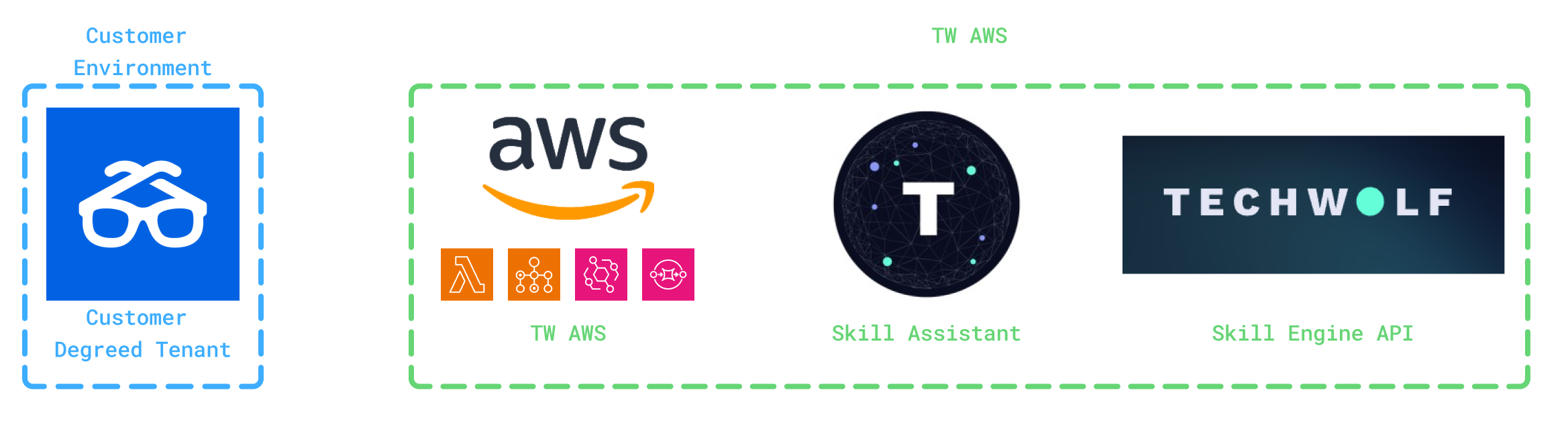
Components
Degreed The Degreed environment used by the customer. AWS infrastructure TechWolf utilizes AWS infrastructure to facilitate communication between Degreed and the Skill Assistant. This infrastructure comprises:- Scheduling infrastructure (EventBridge + SQS + Lambda) + Batch: This scheduler triggers the suggestion flow at defined intervals using a queue and jobs running in AWS Batch, which includes caching, processing skill suggestions from the SEAPI and sending them out.
Data processing
Types of data that is processed- Skill Suggestions: Automatically inferred skills for an employee, retrieved from the Skill Engine API.
- Degreed User Data: Employee details retrieved from Degreed systems, including name.
Data storage
Overview of Data Storage LocationsCommunication Protocols
All data exchanges occur over REST APIs secured by TLS 1.2 or higher.Suggesting Skills
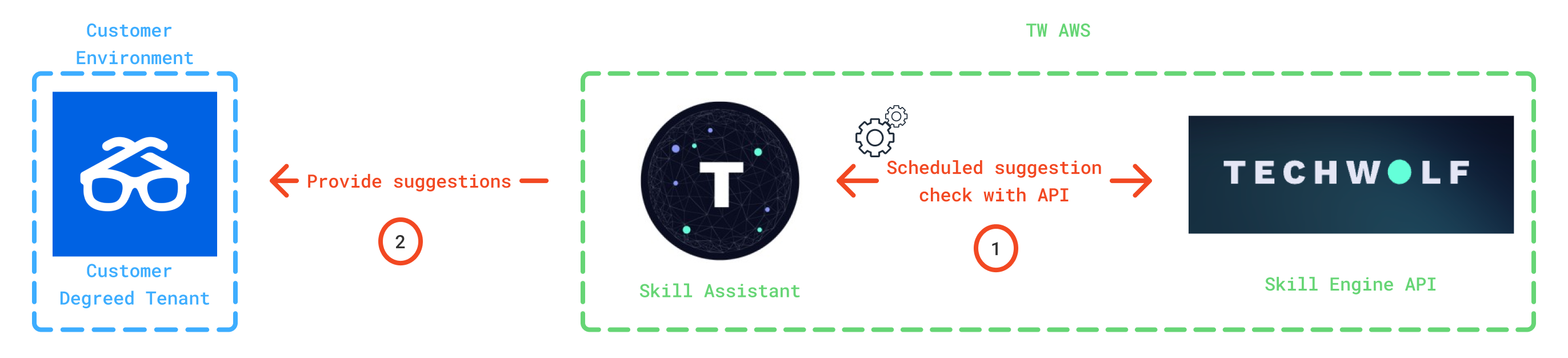
- Fetch suggestions: On a regular basis, the Skill Assistant will fetch suggestions generated by the API.
- Sending the suggestion: The suggestion is sent by the Skill Assistant to the customer Degreed tenant.
- Degreed ID, Internal ID, Suggestion
- Degreed ID, Suggestion