> ## Documentation Index
> Fetch the complete documentation index at: https://developers.techwolf.ai/llms.txt
> Use this file to discover all available pages before exploring further.
# How It Works
## Data Flow
* During the initial setup phase and when new skill vocabulary versions are
released, TechWolf will push and update the external skill mapping in
Workday.
* Worker and Job Skills are synchronized in a bidirectional flow, where Worker
and Job skill data updates in the SkillEngine API are synchronized in
real-time to Workday using a push strategy.
* Workday updates are synced at regular intervals to the SkillEngine API using
a pull strategy. This means that all flows are all initiated by TechWolf.
The frequency by which Workday skills are synchronized to TechWolf is every
2 hours.
* Worker skills synced by the Workday Integration are tracked using the
`source` field in the
[Employee Skill Profile Feedback endpoint ](/reference/latest/Employees/EmployeeProfile/patch-employees-external-id-skill-profile)
payload, tagged as `"workday-integration"`. To retrieve these sources in
an Employee's profile, use the query parameter `?include=sources` in the
[Employee Skill Profile Feedback endpoint ](/reference/latest/Employees/EmployeeProfile/patch-employees-external-id-skill-profile),
which returns the Skill's `source_event` with
`"event_type": "skill_profile_feedback"` and
`"source": "workday-integration"`.
* Job skills synced by the Workday Integration are tracked using the
`source` field in the
[Job Skill Profile Feedback endpoint ](/reference/latest/Jobs/JobProfile/patch-job-architecture-jobs-job-external-id-skill-profile)
payload, tagged as `"workday-integration"`. To retrieve these sources
from a Job, use the
[List Job Profile Data endpoint ]().
Items with `"data_type": "skill_profile_feedback"` and
`"source": "workday-integration"` indicate skills synced by the Workday
Integration.
In summary: For Workers, TechWolf will access Workday's *Talent and Staffing*
Web services to retrieve and update skill data. For Jobs, TechWolf will access
Workday's *Human Resources* Web services to retrieve and update skill data.
TechWolf also synchronizes skill data from external sources and skills from
external systems performing skill harmonization.
### Initial Load
The initial load occurs after the Workday Integration System User credentials
are shared and set up in TechWolf.
The TechWolf team ensures the initial batch of data is loaded into both systems,
starting a process on TechWolf's side.
During the initial data load, customers can choose between two synchronization
strategies:
1. **Merge Strategy**: Combines skills from both Workday and TechWolf systems.
Skills present in Workday but not in TechWolf will be synced to TechWolf, and
vice versa. This preserves existing skill data in both systems. TechWolf
takes precedence over Workday in case of conflicting values.
2. **Overwrite Strategy**: Replaces all skills in Workday with the skill data
from TechWolf. This strategy clears existing Workday skills before importing
TechWolf data.
These synchronization strategies are automatically applied to any new Jobs or
Employees that exist in both Workday and TechWolf systems.
Below is an example demonstrating the merge strategy in action:
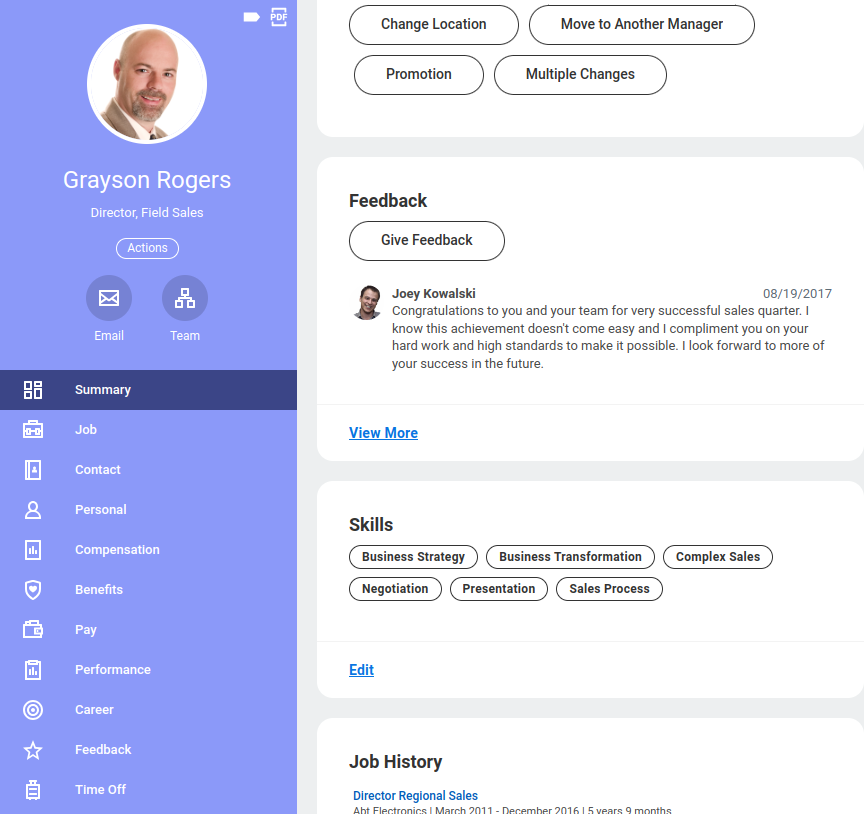
Worker profile of Grayson Rogers before the initial load:
 Assuming a lot of skills have been validated already, we get his profile after
the initial sync:
Assuming a lot of skills have been validated already, we get his profile after
the initial sync:
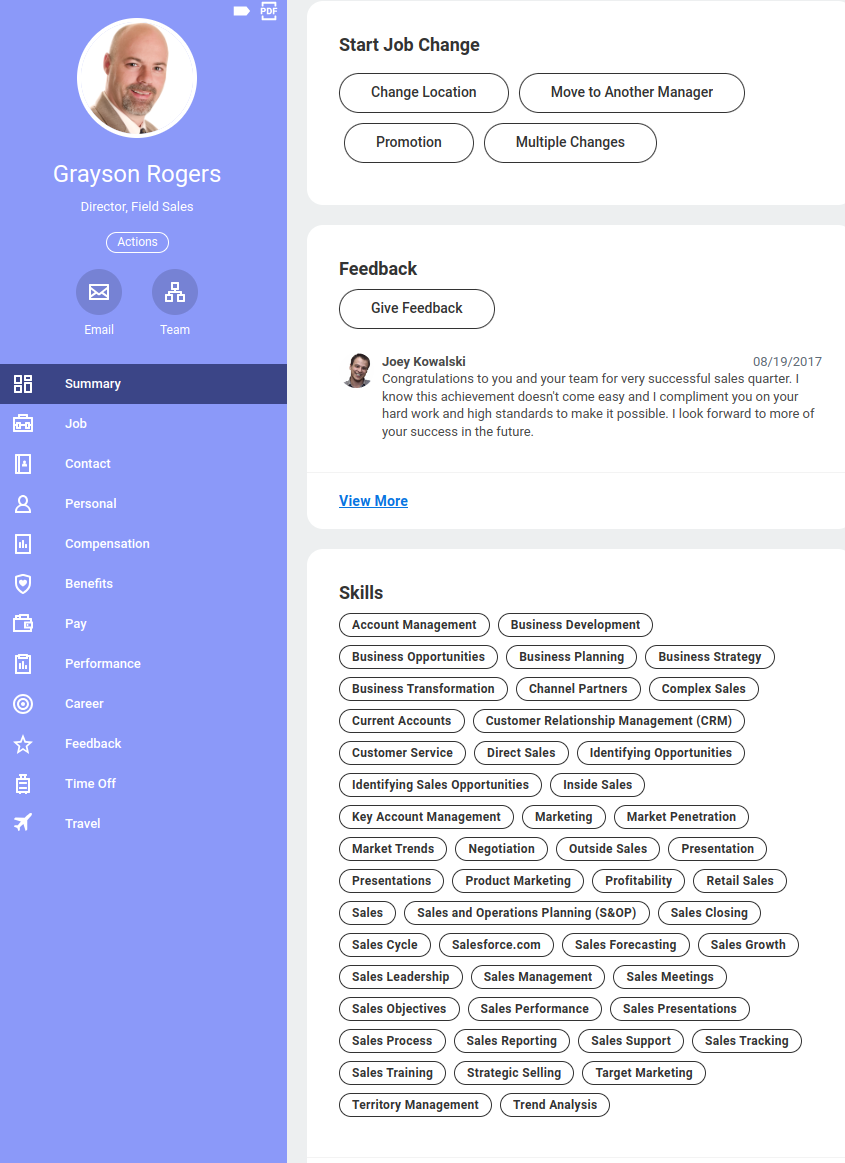 In TechWolf, we see the same profile as before, with the addition of the skills
that were in Grayson's original Workday profile; these are now validated in
TechWolf.
### Important Limitation: Workday-First Precedence
Some customers may require a variation where **Workday takes precedence** over
TechWolf for overlapping skills. This use case is **not natively supported** by
the current synchronization strategies.
**Workaround:**
* Request a **snapshot export from Workday** containing all skills,
criticality, and proficiency values.
* Import this snapshot as feedback into TechWolf to align TechWolf’s profiles
with Workday.
* After alignment, use either the **Merge** or **Overwrite** strategy for the
initial sync. The result will effectively preserve Workday’s precedence
while still enabling bidirectional synchronization.
### Skill Validation in TechWolf
Grayson Rogers validates the skill "Acoustic Modelling" in TechWolf. This
validation is pushed to Workday immediately:
In TechWolf, we see the same profile as before, with the addition of the skills
that were in Grayson's original Workday profile; these are now validated in
TechWolf.
### Important Limitation: Workday-First Precedence
Some customers may require a variation where **Workday takes precedence** over
TechWolf for overlapping skills. This use case is **not natively supported** by
the current synchronization strategies.
**Workaround:**
* Request a **snapshot export from Workday** containing all skills,
criticality, and proficiency values.
* Import this snapshot as feedback into TechWolf to align TechWolf’s profiles
with Workday.
* After alignment, use either the **Merge** or **Overwrite** strategy for the
initial sync. The result will effectively preserve Workday’s precedence
while still enabling bidirectional synchronization.
### Skill Validation in TechWolf
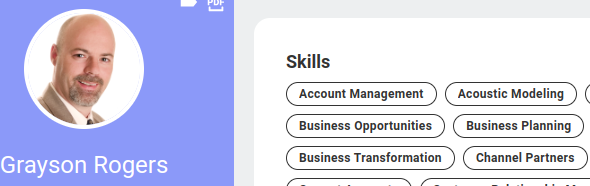
Grayson Rogers validates the skill "Acoustic Modelling" in TechWolf. This
validation is pushed to Workday immediately:
 ### Skill Validation in Workday
When an employee provides feedback in Workday, for example, adds "Facilities
Operations" and removes "Performance Management", the changes are reflected in
TechWolf accordingly. The changes are synchronized **every 2 hours**, so not
immediately in this direction.
### Skill Validation in Workday
When an employee provides feedback in Workday, for example, adds "Facilities
Operations" and removes "Performance Management", the changes are reflected in
TechWolf accordingly. The changes are synchronized **every 2 hours**, so not
immediately in this direction.