> ## Documentation Index
> Fetch the complete documentation index at: https://developers.techwolf.ai/llms.txt
> Use this file to discover all available pages before exploring further.
# How It Works
export const platform_0 = "slack"
# Suggestions
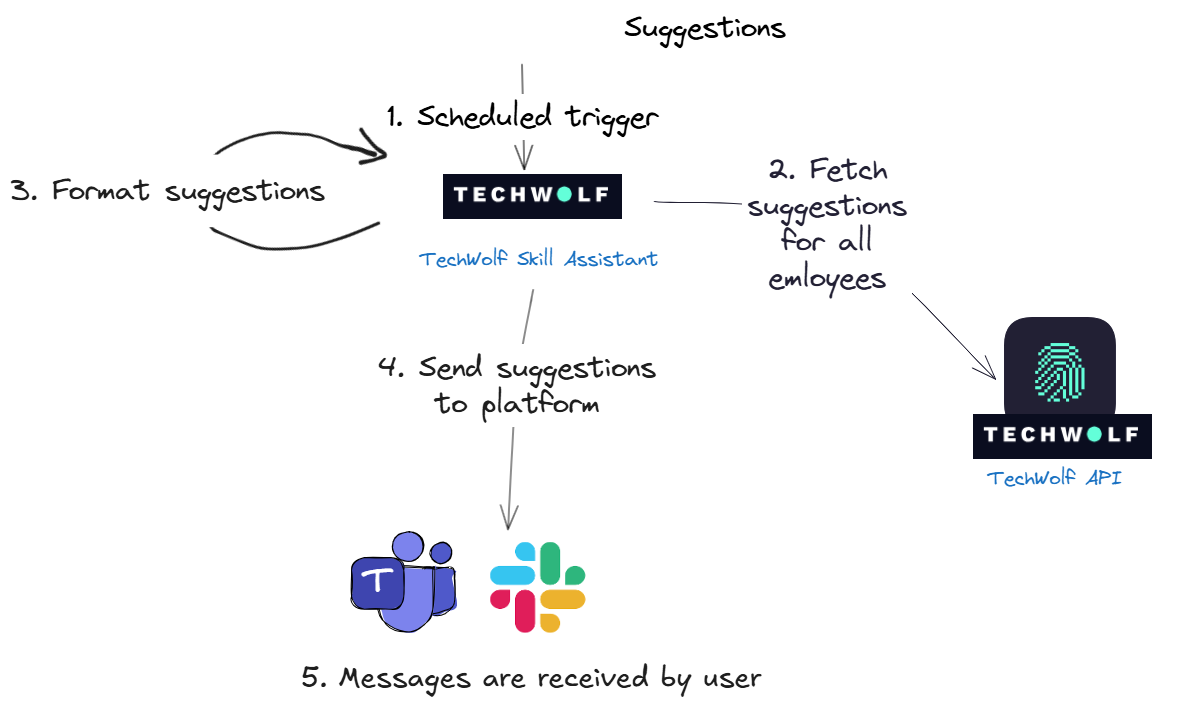 1. **Scheduled trigger**: We send out suggestions at specific time intervals. On
such an interval cycle, we trigger the TechWolf Skill Assistant. The interval
can be changed depending on your needs.
2. **Fetch suggestions**: To get those suggestions, we fetch them from our own
API. More specifically, from the
[Suggestions Skill Profile](/reference/latest/Employees/EmployeeSuggestions/post-employees-suggestions-skills)
endpoint, for all employees.
3. **Format suggestions**:
The Skill Assistant first determines which users should receive suggestions
or reminders. The system determines this by checking when each user last
received a suggestion and comparing it against the configured timing
parameters for suggestions and reminders.
The suggestions are then formatted based on the configurations for the
message content. See how the message looks like in the `How It Looks`
section.
4. **Send suggestions**: We send out the suggestions to the messaging platform.
5. **Users receive the message**: The messaging platform delivers the message to
the correct user.
### How the Skill Engine API max skills setting affects suggestions
The Skill Engine API uses the `max_skills` setting to return the top ranked
Skills for an Employee based on their data. This setting does not directly mean
that an Employee will only ever see that number of suggestions over time.
The ranking is based on the Employee Skill Profile and includes Skills that were
already accepted or rejected. The Skill Engine API then filters out already
validated Skills before suggestions are shown in the Skill Assistant.
#### What happens near the limit
Rejected Skills can still influence the top `max_skills` ranking through an
indirect effect. A rejection acts as feedback for the recommendation model and
can change the confidence scores of related Skills. When an Employee is close to
the limit, this recalculation can reorder the Employee Skill Profile and cause a
different Skill to enter the top `max_skills`.
1. The Skill Engine API returns the top `max_skills` Skills from the Employee
Skill Profile.
2. The Employee validates suggestions (for example, accepts 6 and rejects 4).
3. The recommendation scores are recalculated based on the new feedback,
including the rejection signal, which can change nearby Skill rankings.
4. If this recalculation pulls another Skill into the top `max_skills`, that
Skill can appear as a new suggestion.
#### What happens when data changes
When new Skill Events are added, probabilities can change and different Skills
can enter the top `max_skills` ranking. This can create new suggestions for the
Employee.
1. **Scheduled trigger**: We send out suggestions at specific time intervals. On
such an interval cycle, we trigger the TechWolf Skill Assistant. The interval
can be changed depending on your needs.
2. **Fetch suggestions**: To get those suggestions, we fetch them from our own
API. More specifically, from the
[Suggestions Skill Profile](/reference/latest/Employees/EmployeeSuggestions/post-employees-suggestions-skills)
endpoint, for all employees.
3. **Format suggestions**:
The Skill Assistant first determines which users should receive suggestions
or reminders. The system determines this by checking when each user last
received a suggestion and comparing it against the configured timing
parameters for suggestions and reminders.
The suggestions are then formatted based on the configurations for the
message content. See how the message looks like in the `How It Looks`
section.
4. **Send suggestions**: We send out the suggestions to the messaging platform.
5. **Users receive the message**: The messaging platform delivers the message to
the correct user.
### How the Skill Engine API max skills setting affects suggestions
The Skill Engine API uses the `max_skills` setting to return the top ranked
Skills for an Employee based on their data. This setting does not directly mean
that an Employee will only ever see that number of suggestions over time.
The ranking is based on the Employee Skill Profile and includes Skills that were
already accepted or rejected. The Skill Engine API then filters out already
validated Skills before suggestions are shown in the Skill Assistant.
#### What happens near the limit
Rejected Skills can still influence the top `max_skills` ranking through an
indirect effect. A rejection acts as feedback for the recommendation model and
can change the confidence scores of related Skills. When an Employee is close to
the limit, this recalculation can reorder the Employee Skill Profile and cause a
different Skill to enter the top `max_skills`.
1. The Skill Engine API returns the top `max_skills` Skills from the Employee
Skill Profile.
2. The Employee validates suggestions (for example, accepts 6 and rejects 4).
3. The recommendation scores are recalculated based on the new feedback,
including the rejection signal, which can change nearby Skill rankings.
4. If this recalculation pulls another Skill into the top `max_skills`, that
Skill can appear as a new suggestion.
#### What happens when data changes
When new Skill Events are added, probabilities can change and different Skills
can enter the top `max_skills` ranking. This can create new suggestions for the
Employee.
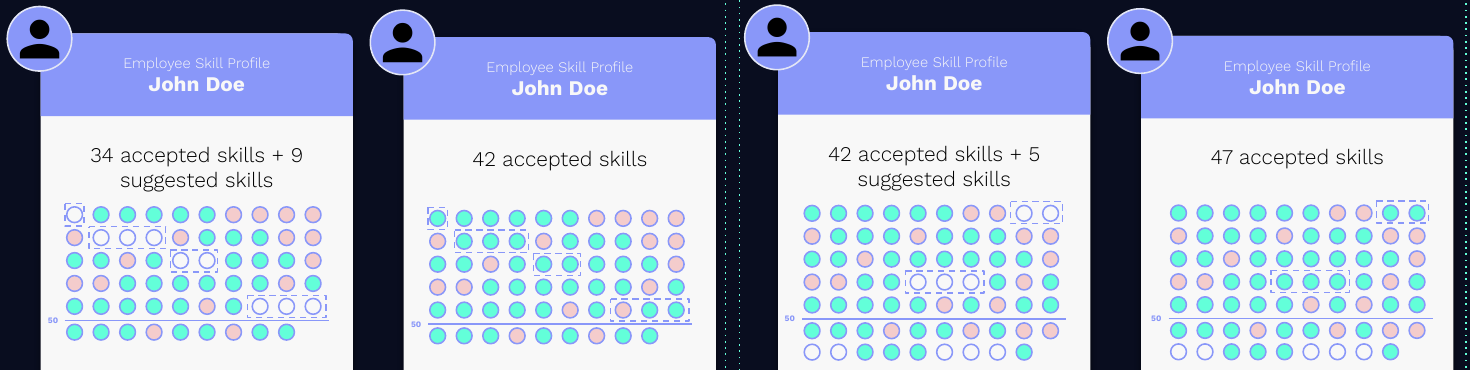 1. New Skill Events are added for the Employee.
2. New inferred Skills are scored and compared against the current top
`max_skills` ranking.
3. Only the new Skills that enter the top `max_skills` become visible
suggestions.
4. Repeating this process over time can lead to more than `max_skills` validated
Skills on an Employee profile.
# Validations
1. New Skill Events are added for the Employee.
2. New inferred Skills are scored and compared against the current top
`max_skills` ranking.
3. Only the new Skills that enter the top `max_skills` become visible
suggestions.
4. Repeating this process over time can lead to more than `max_skills` validated
Skills on an Employee profile.
# Validations
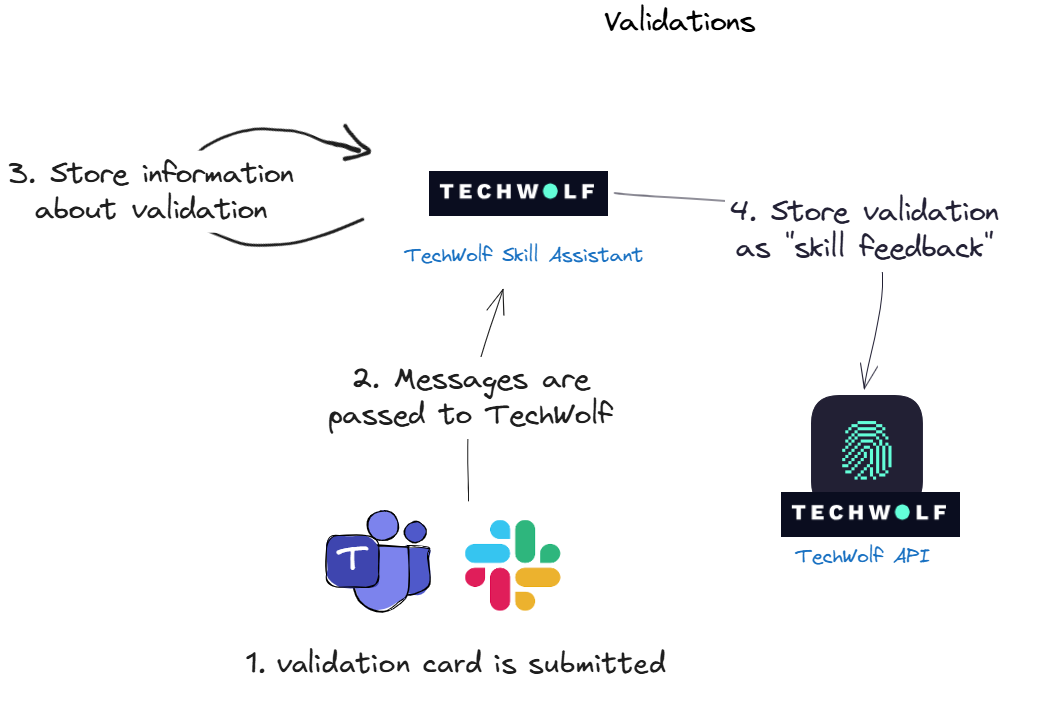 1. The user clicks submit on a card, which informs the messaging platform that
it should send an update to the TechWolf Skill Assistant.
2. The message is received by the Skill Assistant, which receives a list of
confirmed and rejected skills.
3. The TechWolf Skill Assistant stores this information, such as which skills,
but also when and by whom.
4. The feedback is sent to the TechWolf API, using the
[Employee Skill Profile feedback endpoint](/reference/latest/Employees/EmployeeProfile/patch-employees-external-id-skill-profile)
and can be tracked with the `source` field as
1. The user clicks submit on a card, which informs the messaging platform that
it should send an update to the TechWolf Skill Assistant.
2. The message is received by the Skill Assistant, which receives a list of
confirmed and rejected skills.
3. The TechWolf Skill Assistant stores this information, such as which skills,
but also when and by whom.
4. The feedback is sent to the TechWolf API, using the
[Employee Skill Profile feedback endpoint](/reference/latest/Employees/EmployeeProfile/patch-employees-external-id-skill-profile)
and can be tracked with the `source` field as "tw-{platform_0}-bot".
To access feedback provided by an employee through the Skill Assistant, use the
[Employee List Skill Event endpoint](/reference/latest/Employees/SkillEvents/get-employees-employee-external-id-skill-events) with `skill_profile_feedback` as `event_type`.
The resulting Skill Events with `source` field as "tw-{platform_0}-bot" are the feedback events given using the Skill Assistant.
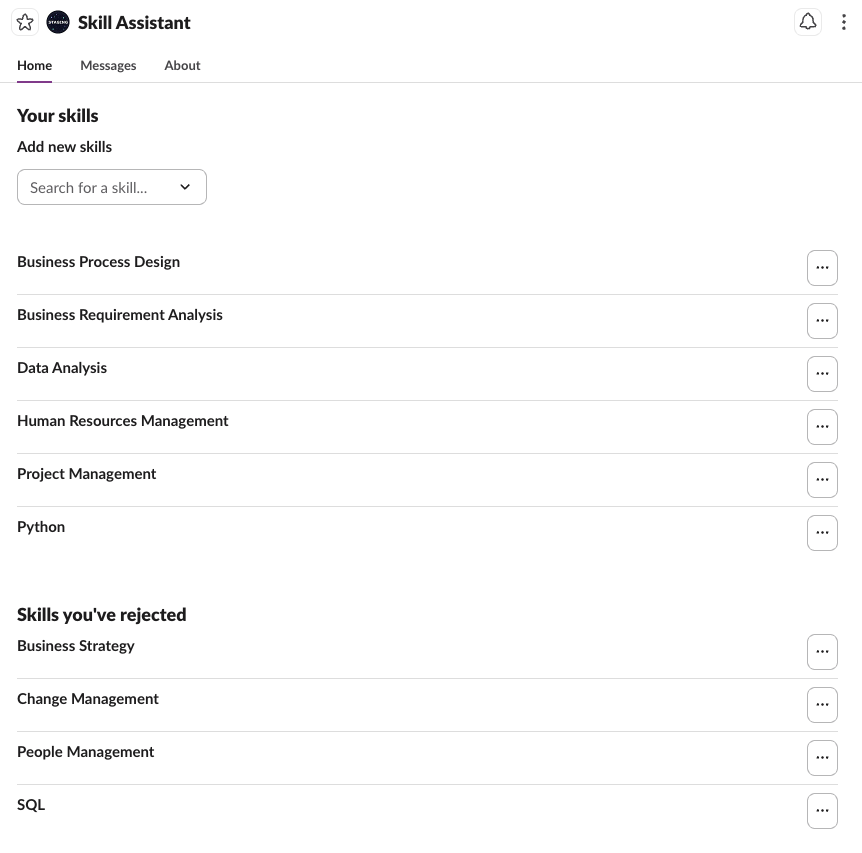
# App Home
In addition to our Skill Assistant:
We offer an App Home that enables employees to efficiently manage and track
their skills. Within the App Home, employees can:
* **View and Reevaluate Skills**: Access their validated and rejected skills for
assessment and potential updates.
* **Add Missing Skills**: Identify and add any skills that may be lacking.
* **Self-rate Skill proficiency levels (optional)**: Update the proficiency
level of a Skill.
 # Linking users through Custom Properties
An important step for the Skill Assistant to work is linking employee profiles
in TechWolf to users in the messaging platform.
This can be done by setting a Custom Property on the employee profile in
TechWolf. The Skill Assistant will then use this Custom Property to link the
employee profile to the user in the messaging platform.
# Data flows
### General overview
# Linking users through Custom Properties
An important step for the Skill Assistant to work is linking employee profiles
in TechWolf to users in the messaging platform.
This can be done by setting a Custom Property on the employee profile in
TechWolf. The Skill Assistant will then use this Custom Property to link the
employee profile to the user in the messaging platform.
# Data flows
### General overview
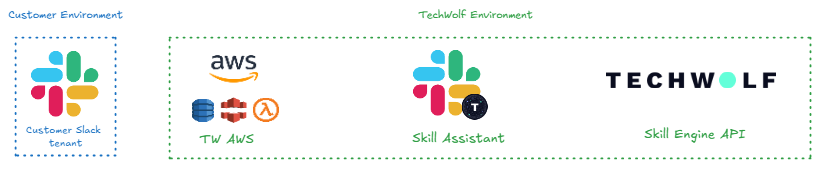 #### Components
**Slack**
The Slack environment used by the customer.
**AWS infrastructure**
TechWolf utilizes AWS infrastructure to facilitate communication between Slack
and the Skill Assistant. This infrastructure comprises:
* **CloudFront**: Processes and routes incoming requests at edge locations,
minimizing latency by handling traffic close to its source.
* **Lambda at Edge**: Processes incoming requests by extracting the Enterprise
or Workspace ID and uses DynamoDB to determine the correct Skill Assistant
deployment region (EU or US) for routing.
* **Global DynamoDB**: Maintains a mapping between Enterprise/Workspace IDs and
their corresponding deployment regions (EU or US).
**Skill Assistant**
TechWolf's backend system responsible for generating skill suggestions,
processing feedback, and managing data for the App Home.
**Skill Engine API**
The main TechWolf product. Handles skill-related data processing and
integration.
#### Data processing
**Types of data that is processed**
* **Skill Suggestions**: Automatically inferred skills for an employee,
retrieved from the Skill Engine API.
* **Skill Feedback**: Employee feedback on their suggested skills. Either
validating that they have the skills, or rejecting the skills.
* **Skill Profile**: A list of validated and rejected skills maintained in the
Skill Engine API.
* **Slack User Data**: Employee details retrieved from Slack systems, including
name.
**Data Processing Overview**
| | **Managed by** | **Suggestions** | **Feedback** | **Skill Profile** | **Slack User Data** |
| ------------------------ | -------------- | --------------- | ------------ | ----------------- | ------------------- |
| **Slack** | Customer | X | X | X | X |
| **AWS: CloudFront** | TechWolf | | | | |
| **AWS: Lambda at Edge** | TechWolf | | X | X | X |
| **AWS: Global DynamoDB** | TechWolf | | | | |
| **Skill Assistant** | TechWolf | X | X | X | X |
#### Data storage
**Overview of Data Storage Locations**
| | **Managed by** | **Suggestions** | **Feedback** | **Skill Profile** | **Slack User Data** |
| ------------------- | -------------- | --------------- | ------------ | ----------------- | ------------------------------------------------- |
| **Slack** | Customer | X | X | | X |
| **AWS** | TechWolf | | | | |
| **Skill Assistant** | TechWolf | X | X | | X *(No personal identifiable information stored)* |
#### **Communication Protocols**
All data exchanges occur over REST APIs secured by **TLS 1.2** or higher.
### Suggesting Skills
#### Components
**Slack**
The Slack environment used by the customer.
**AWS infrastructure**
TechWolf utilizes AWS infrastructure to facilitate communication between Slack
and the Skill Assistant. This infrastructure comprises:
* **CloudFront**: Processes and routes incoming requests at edge locations,
minimizing latency by handling traffic close to its source.
* **Lambda at Edge**: Processes incoming requests by extracting the Enterprise
or Workspace ID and uses DynamoDB to determine the correct Skill Assistant
deployment region (EU or US) for routing.
* **Global DynamoDB**: Maintains a mapping between Enterprise/Workspace IDs and
their corresponding deployment regions (EU or US).
**Skill Assistant**
TechWolf's backend system responsible for generating skill suggestions,
processing feedback, and managing data for the App Home.
**Skill Engine API**
The main TechWolf product. Handles skill-related data processing and
integration.
#### Data processing
**Types of data that is processed**
* **Skill Suggestions**: Automatically inferred skills for an employee,
retrieved from the Skill Engine API.
* **Skill Feedback**: Employee feedback on their suggested skills. Either
validating that they have the skills, or rejecting the skills.
* **Skill Profile**: A list of validated and rejected skills maintained in the
Skill Engine API.
* **Slack User Data**: Employee details retrieved from Slack systems, including
name.
**Data Processing Overview**
| | **Managed by** | **Suggestions** | **Feedback** | **Skill Profile** | **Slack User Data** |
| ------------------------ | -------------- | --------------- | ------------ | ----------------- | ------------------- |
| **Slack** | Customer | X | X | X | X |
| **AWS: CloudFront** | TechWolf | | | | |
| **AWS: Lambda at Edge** | TechWolf | | X | X | X |
| **AWS: Global DynamoDB** | TechWolf | | | | |
| **Skill Assistant** | TechWolf | X | X | X | X |
#### Data storage
**Overview of Data Storage Locations**
| | **Managed by** | **Suggestions** | **Feedback** | **Skill Profile** | **Slack User Data** |
| ------------------- | -------------- | --------------- | ------------ | ----------------- | ------------------------------------------------- |
| **Slack** | Customer | X | X | | X |
| **AWS** | TechWolf | | | | |
| **Skill Assistant** | TechWolf | X | X | | X *(No personal identifiable information stored)* |
#### **Communication Protocols**
All data exchanges occur over REST APIs secured by **TLS 1.2** or higher.
### Suggesting Skills
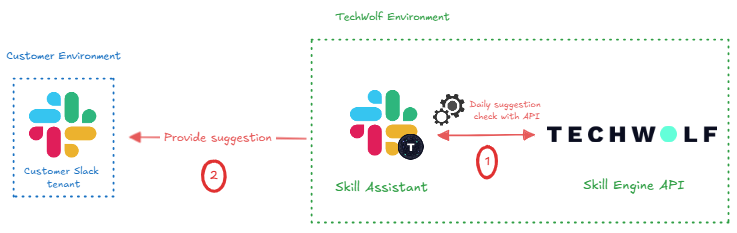 **Process**
1. **Fetch suggestions**: On a regular basis, the Skill Assistant will fetch
suggestions generated by the API.
2. **Sending the suggestion**: The suggestion is sent by the Skill Assistant to
the customer Slack tenant.
**Data Involved**
1. Slack ID, Internal ID, Suggestion
2. Slack ID, Suggestion
### User Input
User input entails button clicks, messages and App Home interactions.
**Process**
1. **Fetch suggestions**: On a regular basis, the Skill Assistant will fetch
suggestions generated by the API.
2. **Sending the suggestion**: The suggestion is sent by the Skill Assistant to
the customer Slack tenant.
**Data Involved**
1. Slack ID, Internal ID, Suggestion
2. Slack ID, Suggestion
### User Input
User input entails button clicks, messages and App Home interactions.
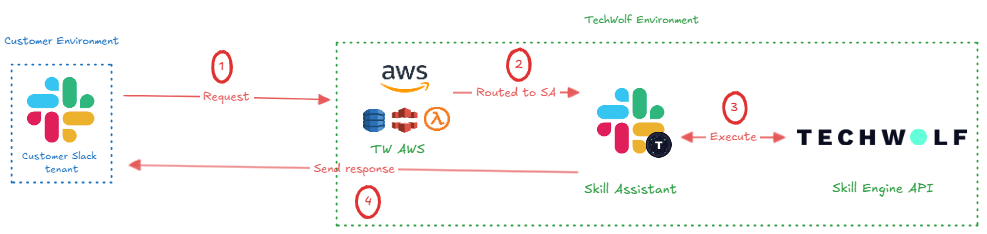 1. **User input request**: When a user interacts with a suggestion or the App
Home, it is sent to CloudFront in the TechWolf AWS instance.
2. **Routing to Skill Assistant**: The request is processed and routed by
CloudFront to the Skill Assistant. Only necessary information is retained,
and names and email addresses are dropped.
3. **Execution of request**: The Skill Assistant directs the request in proper
format to the API, where the request is executed on the customer's data.
4. **Response to user**: A response, based on the request's proper execution, is
sent back to the concerning Slack user.
**Data Involved**
1. [Event Data](https://api.slack.com/events) or
[Interactivity Data](https://api.slack.com/reference/interaction-payloads/block-actions),
Feedback, Slack User Data (Contains the name of the user which cannot be
dropped from the request.)
2. [Event Data](https://api.slack.com/events) or
[Interactivity Data](https://api.slack.com/reference/interaction-payloads/block-actions),
Feedback, Slack User Data (Contains the name of the user which cannot be
dropped from the request.)
3. Internal ID, Slack ID, Depending on the event: Feedback, Request suggestions
or Skill Profile
4. Slack ID, Custom response, Depending on the event: Suggestion or Skill
Profile
1. **User input request**: When a user interacts with a suggestion or the App
Home, it is sent to CloudFront in the TechWolf AWS instance.
2. **Routing to Skill Assistant**: The request is processed and routed by
CloudFront to the Skill Assistant. Only necessary information is retained,
and names and email addresses are dropped.
3. **Execution of request**: The Skill Assistant directs the request in proper
format to the API, where the request is executed on the customer's data.
4. **Response to user**: A response, based on the request's proper execution, is
sent back to the concerning Slack user.
**Data Involved**
1. [Event Data](https://api.slack.com/events) or
[Interactivity Data](https://api.slack.com/reference/interaction-payloads/block-actions),
Feedback, Slack User Data (Contains the name of the user which cannot be
dropped from the request.)
2. [Event Data](https://api.slack.com/events) or
[Interactivity Data](https://api.slack.com/reference/interaction-payloads/block-actions),
Feedback, Slack User Data (Contains the name of the user which cannot be
dropped from the request.)
3. Internal ID, Slack ID, Depending on the event: Feedback, Request suggestions
or Skill Profile
4. Slack ID, Custom response, Depending on the event: Suggestion or Skill
Profile